Introduction
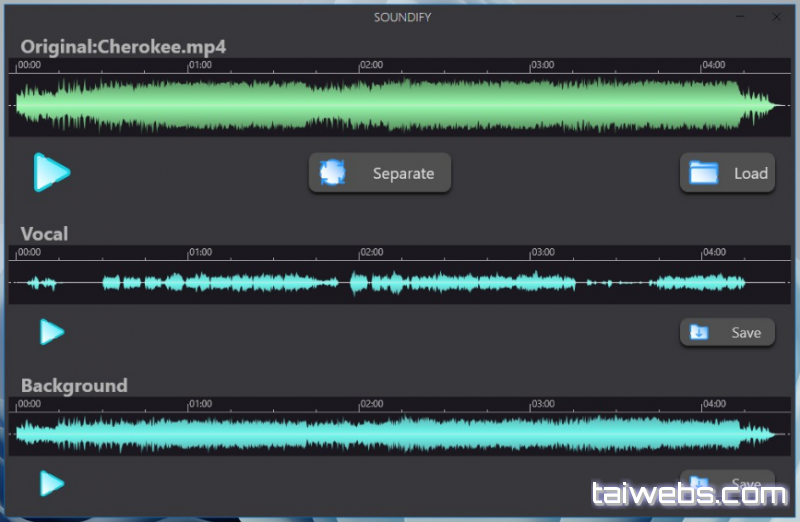
Soundify Vocal Remover is an AI-powered audio processing tool designed to separate vocals and instrumentals from any song with exceptional clarity. Ideal for musicians, DJs, content creators, karaoke makers, and audio engineers, the software uses advanced machine-learning algorithms to isolate vocal tracks, remove them, or extract them for remixing and production. Soundify offers fast processing, high-quality output, and an intuitive interface, making professional-grade audio separation accessible even to users with no technical audio editing background.
Key Features
- AI-based vocal removal to cleanly separate vocals from background music.
- Extract instrumentals for karaoke, live performance, or remix purposes.
- Support for popular audio formats including MP3, WAV, FLAC, OGG, and more.
- High-quality output with minimal artifacts thanks to advanced neural processing.
- Batch processing to handle multiple audio files efficiently.
- Real-time preview capability to compare original, vocal-only, and instrumental versions.
- Simple drag-and-drop workflow suitable for beginners and professionals.
- Ability to isolate additional audio elements depending on the model used (drums, bass, piano, etc.).
- Fast processing engine optimized for modern CPUs and GPUs.
- Useful for karaoke creators, mashup editors, podcast producers, and studio workflows.
Conclusion
Soundify Vocal Remover delivers a powerful, modern approach to vocal extraction and instrumental creation using advanced AI technology. With excellent separation quality, flexible output options, and easy operation, it is a valuable tool for both hobbyists and professional audio workers. Whether producing karaoke tracks, editing vocals, creating remixes, or enhancing studio projects, Soundify provides reliable, high-quality results with minimal effort.
System Requirements
- Operating System: Windows 7, 8, 8.1, 10, 11
- CPU: Intel/AMD dual-core or higher (AI models benefit from multi-core CPUs)
- RAM: Minimum 4 GB (8 GB recommended for large files)
- Disk Space: Around 300 MB required
- Optional: GPU acceleration if supported by AI model