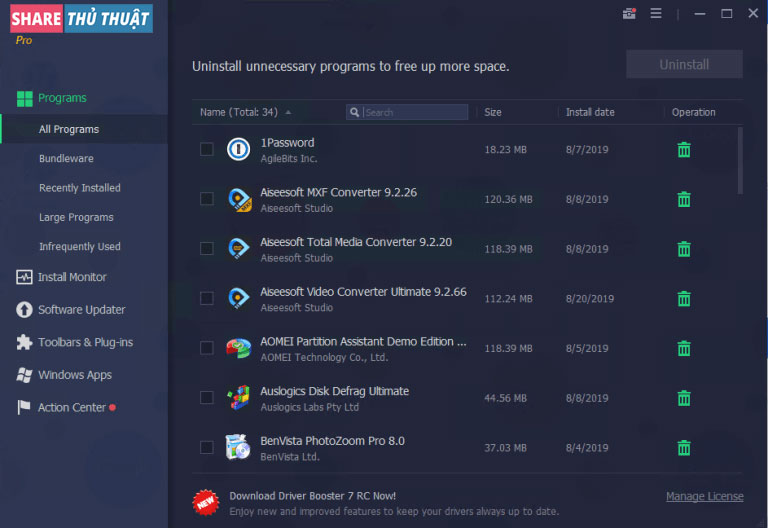
Introduction
IObit Uninstaller Pro is a comprehensive software removal utility designed to uninstall unwanted programs, Windows apps, browser extensions, and stubborn applications that cannot be removed through standard methods. Known for its deep-cleaning capabilities, the software eliminates leftover files, registry entries, and hidden components to maintain a clean and optimized Windows system. Ideal for both home users and IT technicians, IObit Uninstaller Pro ensures complete and safe removal of software, improving system performance and freeing valuable disk space.
Key Features
- Complete uninstallation of programs, including stubborn and bundled applications.
- Deep scan mode to detect and remove leftover files, registry entries, and residual folders.
- Uninstall Windows apps and UWP apps that cannot be removed normally.
- Browser plugin and extension management for Chrome, Firefox, Edge, and others.
- Software Health module for monitoring outdated, risky, or problem-causing applications.
- Batch uninstallation for removing multiple programs simultaneously.
- Installation Monitor tracks system changes made by newly installed programs for more accurate uninstallation.
- Force Uninstall feature to eliminate corrupted or incomplete program entries.
- Startup optimization tools to improve boot times and overall performance.
- Lightweight interface with fast scanning and minimal resource usage.
Conclusion
IObit Uninstaller Pro delivers a powerful and efficient solution for managing and removing unwanted software from Windows systems. By offering complete uninstallation, deep-cleaning capabilities, and extended support for browser extensions and Windows apps, the tool helps maintain system cleanliness, improve performance, and prevent software conflicts. Whether for personal PC maintenance or professional IT workflows, it remains one of the most dependable uninstaller utilities available.
System Requirements
- Operating System: Windows XP, Vista, 7, 8, 8.1, 10, 11
- CPU: Intel/AMD processor 1 GHz or higher
- RAM: Minimum 1 GB
- Disk Space: Around 100 MB required
- Internet Connection: Needed for database updates and plugin management