Introduction
USB Safely Remove 7 is a professional USB management tool designed to replace the default Windows “Safely Remove Hardware” function with a faster, safer, and more feature-rich alternative. The software helps users quickly stop, eject, identify, and manage USB flash drives, external drives, memory card readers, and other hot-plug devices. It prevents accidental data loss, provides clear device identification, and offers automation features that make removable device handling significantly more efficient than the built-in Windows utility.
Key Features
- Quick and safe removal of USB devices without freezing or long delays.
- Accurate identification of connected devices with custom names and icons.
- Automatically stop USB devices that cannot be ejected due to locked files.
- Displays detailed information including drive letters, device type, size, and connection port.
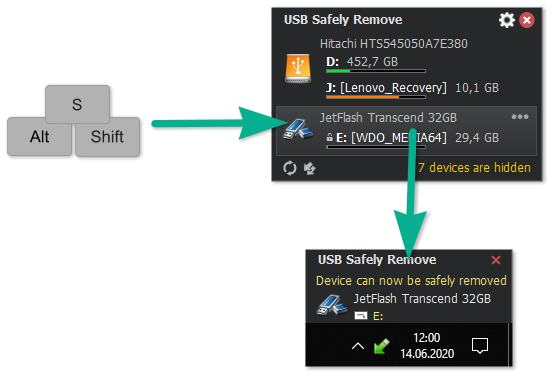
- Hotkey support to instantly stop or eject devices with keyboard shortcuts.
- Power-off feature for external drives that support hardware-level shutdown.
- Autorun manager to control programs that run automatically when devices are connected.
- Return stopped devices without physically reconnecting them.
- Command-line control for automation and IT administrative workflows.
- Low system resource usage with a clean, intuitive interface.
Conclusion
USB Safely Remove 7 is an excellent upgrade for users who frequently handle removable storage devices and want greater safety, flexibility, and control than Windows provides. Its fast device stopping, automation options, detailed device info, and prevention of accidental removal make it invaluable for power users, IT staff, and anyone storing important data on external drives. The software offers a smoother and more reliable workflow for managing USB devices of all kinds.
System Requirements
- Operating System: Windows XP, Vista, 7, 8, 8.1, 10, 11
- CPU: Intel/AMD processor, 1 GHz or higher
- RAM: Minimum 1 GB
- Disk Space: Around 20 MB required
- Administrator rights needed for some system-level device operations