Introduction
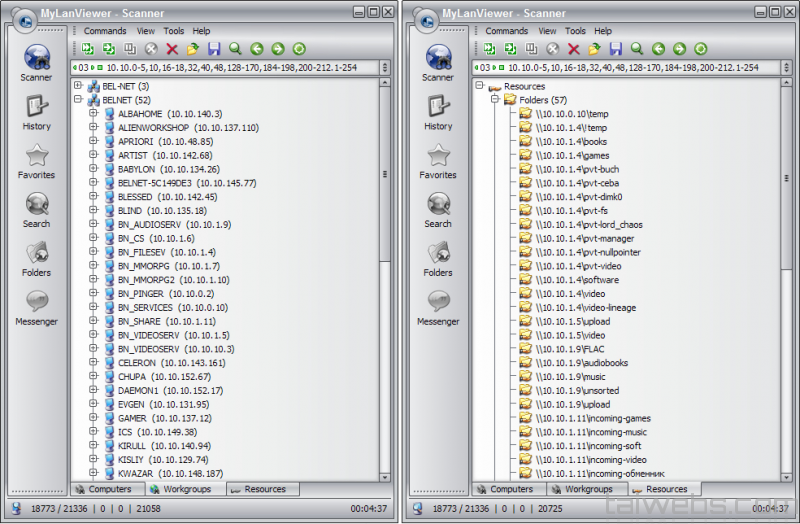
MyLanViewer Enterprise is a powerful local network scanning and monitoring utility designed for administrators, IT technicians, and advanced users who need full visibility and control over LAN environments. The software detects all connected devices, identifies shared resources, monitors network activity, and provides real-time alerts for network changes. Its intuitive interface, precise scanning engine, and advanced security tools make it a reliable solution for managing home networks, office LANs, and small-to-medium business infrastructures.
Key Features
- Real-time LAN scanning to detect computers, smartphones, printers, and all connected network devices.
- Detailed device information including IP, MAC address, hostname, OS version, and network status.
- Advanced subnet scanning with customizable scan ranges and deep host detection.
- Network monitoring alerts notify users when devices go online, offline, or change configuration.
- Built-in tools for detecting shared folders, open ports, and unauthorized devices.
- NetBIOS and SNMP support for detailed device interrogation.
- Remote shutdown, restart, logoff, and wake-on-LAN capabilities for supported systems.
- History logs for tracking network changes over time.
- Message broadcasting and LAN chat functions for local communication.
- User-friendly interface suitable for both IT professionals and everyday users.
Conclusion
MyLanViewer Enterprise delivers a robust and efficient solution for monitoring and managing local network environments. Its scanning accuracy, device tracking features, and administrative tools make it a valuable asset for diagnosing connectivity issues, identifying unauthorized access, and maintaining network stability. Whether used in office settings or home networks, the software provides clear insights and powerful controls for seamless network management.
System Requirements
- Operating System: Windows XP, Vista, 7, 8, 8.1, 10, 11
- CPU: Intel/AMD 1 GHz or faster
- RAM: Minimum 1 GB
- Disk Space: Around 30 MB free
- Network: LAN connection for device scanning and monitoring features