Share to be shared__

Generic selectors
Exact matches only
Search in title
Search in content
Post Type Selectors

EasyUEFI Technician WinPE (by Hasleo) 6.0.1

easyuefi-screen

Professional UEFI boot management toolkit

Introduction

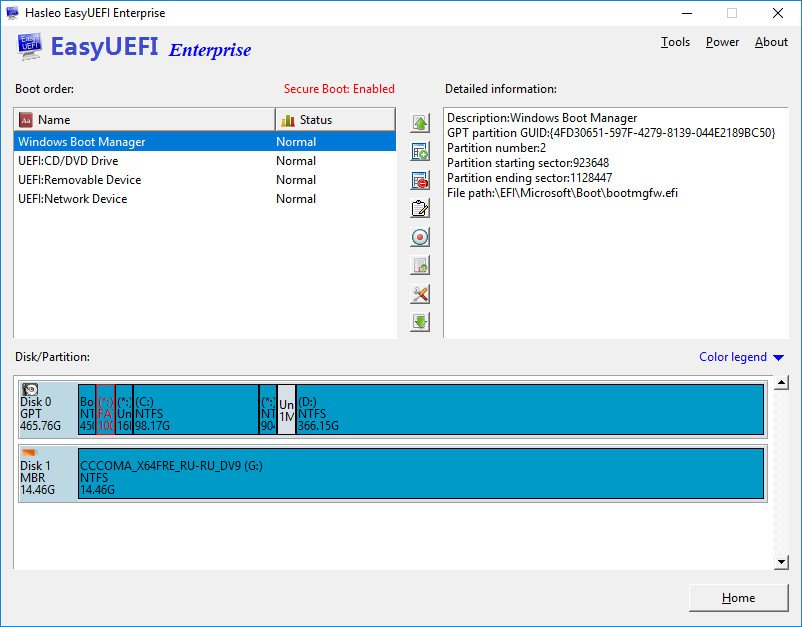
EasyUEFI Technician WinPE by Hasleo is a professional boot management and system recovery toolkit designed for IT technicians, system administrators, and advanced users who need full control over UEFI/EFI boot options. Delivered as a WinPE-based environment, it allows users to manage UEFI boot entries, fix boot errors, migrate operating systems, and perform disk/partition operations even when Windows cannot start. This portable edition is especially useful for repair centers and technicians who require a standalone, bootable solution for diagnosing and restoring non-bootable systems.

Key Features

  • Create, delete, edit, clean, or backup/restore UEFI boot entries directly from WinPE.
  • Repair corrupted EFI/UEFI boot managers for Windows systems that fail to start.
  • Rebuild EFI System Partition (ESP) easily when ESP is missing or damaged.
  • Clone, migrate, or move Windows OS to another SSD/HDD without reinstalling.
  • Partition management tools: create, delete, format, resize, or rebuild partitions.
  • Standalone WinPE environment — run independently of installed OS.
  • Support for GPT/UEFI and legacy BIOS/MBR disks.
  • Useful for data recovery workflows and system disaster recovery tasks.
  • Technician License allows commercial usage in repair shops or IT service companies.

Conclusion

EasyUEFI Technician WinPE is an indispensable toolkit for professionals working with PC repair, OS deployment, and boot troubleshooting. Its standalone WinPE environment ensures that system recovery is possible even when Windows is completely unbootable. With powerful UEFI management, partitioning utilities, and migration features, this toolkit provides a reliable and efficient solution for restoring system integrity and supporting technical service operations.

System Requirements

  • Boot Environment: Windows PE (included with Technician Edition)
  • Supported Systems: Windows 7, 8, 8.1, 10, 11
  • CPU: Intel or AMD x86/x64 processor
  • RAM: Minimum 1 GB (2 GB recommended)
  • Disk: 512 MB free space for boot media creation
  • Boot Mode Support: UEFI/GPT and Legacy BIOS/MBR

Software Information

Basic details about this download.

⬇ Downloads 21
Software name
EasyUEFI Technician WinPE (by Hasleo)
Version
6.0.1
Published date
2025-12-07
Last updated
2025-12-07
File name
EasyUEFI-hoquangdai.com.zip
File size
507.03 MB
Downloads
21
Pass unzip: hoquangdai.com
How to install?
View readme.txt file
Tag_
Search_
Popular search keywords for this software:
🔍 EasyUEFI Technician WinPE (by Hasleo)
🔍 EasyUEFI Technician WinPE (by Hasleo) download
🔍 download EasyUEFI Technician WinPE (by Hasleo)
🔍 EasyUEFI Technician WinPE (by Hasleo) free download
🔍 free download EasyUEFI Technician WinPE (by Hasleo)
🔍 EasyUEFI Technician WinPE (by Hasleo) latest version
🔍 download EasyUEFI Technician WinPE (by Hasleo) latest version
🔍 EasyUEFI Technician WinPE (by Hasleo) full version
🔍 EasyUEFI Technician WinPE (by Hasleo) offline installer
🔍 download EasyUEFI Technician WinPE (by Hasleo) for Windows
🔍 full download EasyUEFI Technician WinPE (by Hasleo) for Windows
🔍 free download EasyUEFI Technician WinPE (by Hasleo) for Windows
🔍 EasyUEFI Technician WinPE (by Hasleo) 64 bit download
🔍 EasyUEFI Technician WinPE (by Hasleo) setup download
🔍 safe download EasyUEFI Technician WinPE (by Hasleo)
🔍 direct download EasyUEFI Technician WinPE (by Hasleo)
🔍 EasyUEFI Technician WinPE (by Hasleo) 6.0.1
🔍 EasyUEFI Technician WinPE (by Hasleo) 6.0.1 download

Leave a Reply

Your email address will not be published. Required fields are marked *

Chat Now

Community Chat

Enter your email and message to join the conversation. Messages are public.

I
inf*
2025-12-07 14:34:36
hello
I
inf*
2025-12-07 17:00:39
update Autodesk HSMWorks Ultimate 2019

Most Download & Stast

📄 Posts
181
💬 Comments
2
👁 Total Views
20,149

New Comment

Recent Comments

Latest discussions from your posts.

H
Ho Quang Dai View post
on IDimager Photo Supreme 2025.3.3.8136
“LIKE”
A
Alex Rivera View post
on IDimager Photo Supreme 2025.3.3.8136
“Interesting piece on Photo Supreme 2025, shows how robust DAM needs to be for fast-paced studios. I …”

Category

Tag Cloud